Aerodynamics as a Software Engineer??? Part 1

Monday Morning Meeting
Today was a very intense start of the day that turned out to be much more exciting than it should have been.
Getting to my office, we have our beginning-of-week meeting to talk about what needs to be done and how we are moving along with our projects.
As I just came back from my vacation, I was pretty excited to get back to work on my 2 main projects in the company:
- Reliability Node System
- ERP system
We sit down, 20 minutes pass through the meeting, my name hasn't been called yet, or talked to.
I start to prepare myself mentally for what needs to be improved in those systems that I'm working on:
- Flexible screenshot uploading feature
- Improving CLI and Error Handling for better user experience
- Simplifying between-server communication
Almost fully disregarding what my manager is talking about…
Out of nowhere at the end of the meeting, I hear my name…
"George, we have been getting lots of complaints recently that our systems are too noisy in the server racks - we identified the issue.
The cooling fans are working at 100% speed all of the time.
We believe it's because the CPU temperature is high even with the heatsink and 5 fans pointing at it.
Maybe there are some air conflicts and the air actually doesn't go through the heatsink's fins.
Can you take a look and maybe create a solution?"
In my head I say:
"How the F*CK do I need to create a solution? I'm no aerospace engineer or whoever works on these problems."
Though I find it interesting to find the solution.
So I say yes, will do, and head to my desk thinking of what my next steps are.
Preparation
As all the proper and intellectual engineers…
I opened up ChatGPT…
And asked it:
"Give me the 5 top most important resources about aerodynamics, especially with fans"
That will be able to quickly give me an overview of what "aerodynamics" is and all the important parts to just keep in mind while working on this.
Of course most of the resources are blocked by a paywall.
But 1,
And ONLY 1,
Is open and what I used to help me gain my knowledge through this solution creation.
NREL's Improving Fan System Performance Guide
(Well, also help from my managers and co-workers, thank you guys if you are reading this <3)
Technicalities For This Problem
Our system is a big box that needs tons of power to run everything inside.
It looks like this:
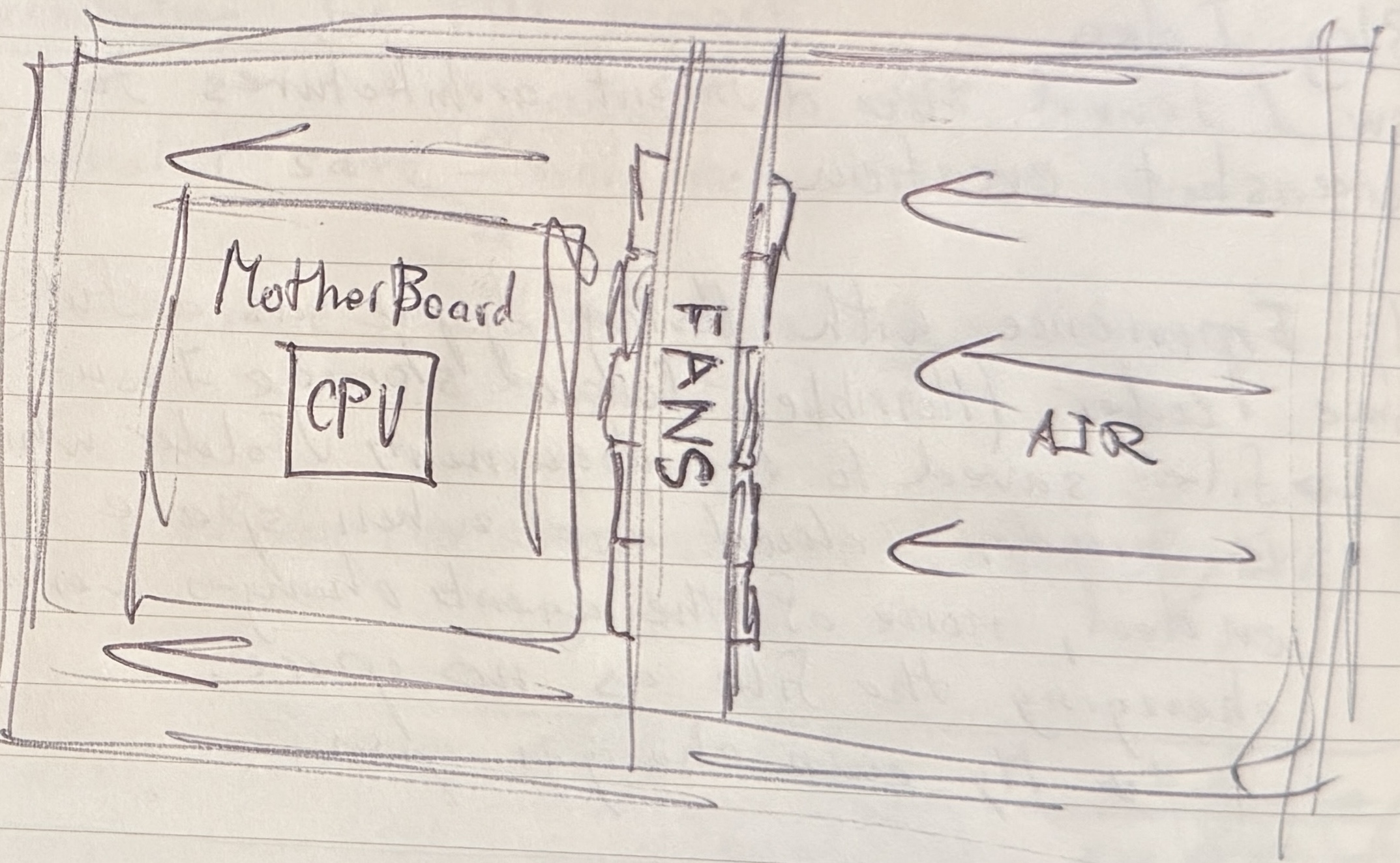
Drawn by me, as I didn't get permission to post the actual photo.
The fans are side by side, in the middle of the box. (The idea is tons of holes from the front and back of the box, so that they create full-box uniform air movement - most server systems are done the same way - so we took the idea from there.)
CPU heatsink is around 6.5cm away from the fans.
Important to keep in mind: dimensions of the box are 1U: 48.3cm x 76.2cm x 4.3cm
Now getting to the actual values of the system, that are more internal:
- CPU temperature (with nothing) is holding in the numbers of 82-88 degrees Celsius (I used the ipmitool library for Ubuntu to get these numbers)
- Fans Max RPMs are 24,000
(We didn't record the dB of the sound, but for future tests we did.)
Now, as I realized soon, these are not the only values I needed to think of to create a solution for this problem.
More about this later.
Initial Thoughts
I started reading this quick ~50 page documentation/textbook about fan systems.
I learned that there are 2 different fans:
- Axial - Air enters straight into the fan and out from the other side
- Centrifugal - Air enters straight into the fan but comes out radially
Both have their use cases but that doesn't matter, we are using axial, that's all I needed to know.
First thought of everyone trying to solve this issue is:
"Let's lower the RPMs. The fans will work slower so less noise."
Quickly we realized it's harder than it looks.
The "motherboard + fan" combination we were using didn't allow us to control the fans.
BIOS had nothing, and the motherboard software didn't have anything either.
(Tbh, my first solution was to maybe engineer a setup where the sound waves would be destructive - something like noise-canceling headphones - but one co-worker pointed out right away that this is only possible at a specific location in space. SO THAT shut down quickly haha.)
So knowing that, we decided to test with lower RPM fans that we had, which were 16,000 RPM.
Funny enough, the temperature of the CPU lowered down.
I have a predicament of why that happened, but I'll explain that later on, when I learned a little more about aerodynamics.
The new initial values were:
- CPU temperature is holding in the numbers of 76-83 degrees Celsius
- Sound next to the system is ~77.6dB and maxed out at ~88.3dB
- Sound ~2 meters away from the system is ~58.3dB average and maxed out at 59.0dB (We used a phone app called Decibel X to measure that.)
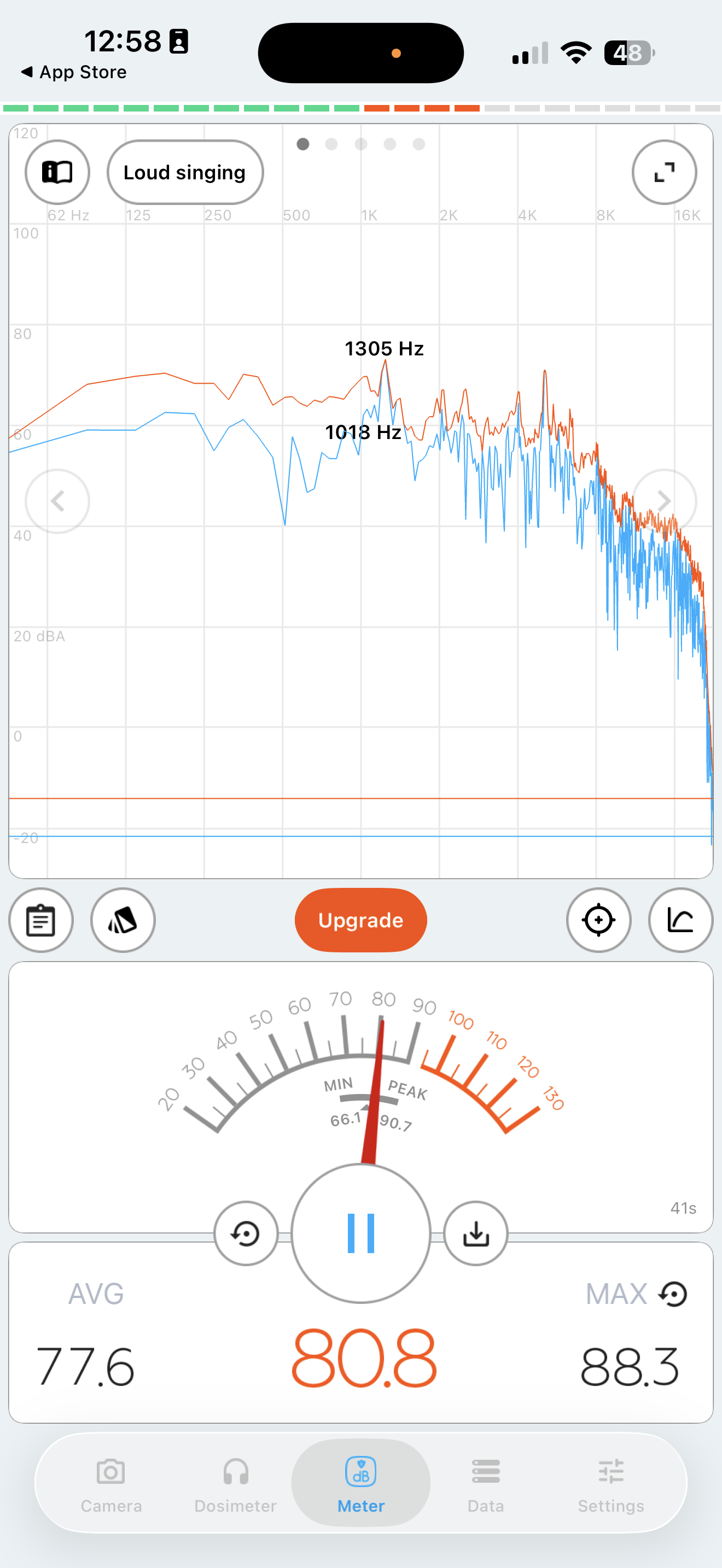
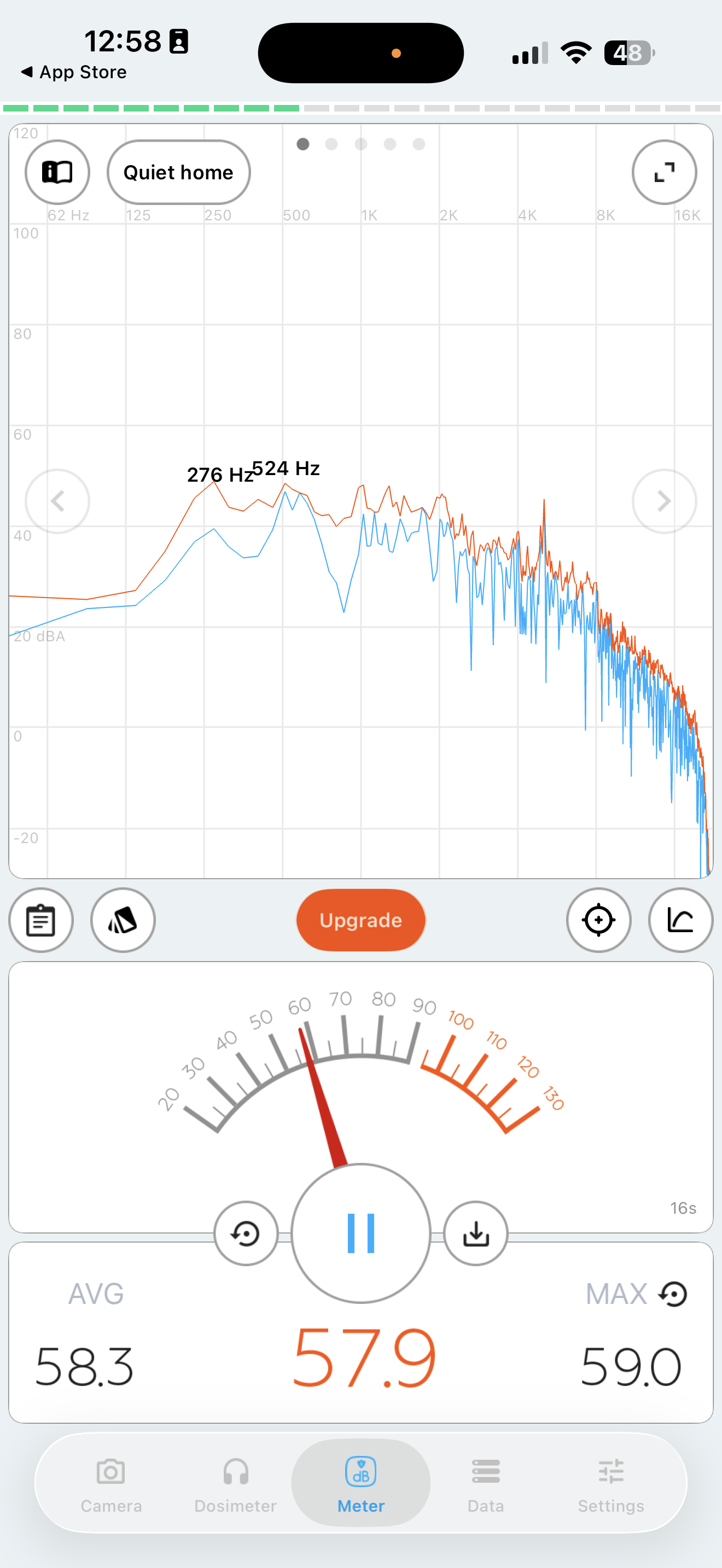
Initial sound measurements using Decibel X app. Left: right next to system (~77.6dB avg). Right: 2 meters away (~58.3dB avg).
Still loud compared to other companies' systems that we have in the lab.
So now if the temperature of the system is lower, with lower RPMs, meaning less air pressure…
"Maybe it's turbulence?"
I truly didn't understand the physics behind turbulence, so I started researching what it is, and the way I explained it to myself is:
"Turbulence happens when there is a change in air pressure, vortexes, different obstacles, or destructive air movement, creating a shake, which could create that sound."
(Well, there are other problems that could also happen with turbulence. E.g., turbulence creates a shake, which could damage the actual fins of the heatsink, it could also break maybe some small parts off, and create a way worse efficiency of the system, which could cost a lot - but with the sound being the only problem, that's what I had my mind on.)
So that got me to the math behind turbulence.
My instinct was:
Heatsink fins are so close to each other that maybe at a specific speed, the air doesn't enter the fins, taking away that heat from the fins, and so temperature is still high, so it keeps telling the fans to spin at 100%.
Simple, I thought:
"If there is a specific speed where the air sees that heatsink as a wall, making it go around and not through,
Then we need to find what is the speed we need for the heatsink to stay at the laminar state (new vocab word I learned haha) and push the air at that speed at the entrance of the heatsink."
(Later I figured that laminar is just the "good" phase of the different turbulence phases, and that it's just the velocity through the fins that it needs to move at to stay at that phase, and also I totally didn't know at this point that there is acceleration through the fins haha.)
Quick search gave me the Reynolds Number, which is formulated in this way:
Re = (ρVDₕ) / μ
- Re ~< 2300 to stay in laminar state
- ρ = air density (~1.2 kg/m³)
- μ = air dynamic viscosity (~1.8×10⁻⁵ Pa·s)
- Dₕ = hydraulic diameter of a fin channel (m)
- V = average air velocity in the fin channels (m/s)
Now if we know the Re, we can easily calculate the air velocity that we need:
Dₕ needs to be calculated differently for a heatsink, which is:
Dₕ = (2HW) / (H + W)
- H = Height (~26.9mm)
- W = width, but for us it will be the fin gap (~0.3mm)
So now knowing that, we can find Dₕ:
Dₕ = (2HW) / (H + W) ≈ 2W
Just because H >>> W, we can just eliminate it - that's how I simplified it like that.
Back to the Re formula.
Re < 2300 to stay in laminar state, so:
2300 > (ρVDₕ) / μ
V = (2300μ) / (ρDₕ)
V ≈ 47.9 m/s
At this point I know FOR A FACT there is no way my fans are pushing this much air out.
But just to make sure that's a fact, I calculated the maximum speed that our fans are pushing the air out:
The simple velocity output of a fan is:
V = Q / A
- V = Velocity (m/s)
- Q = Volumetric Flow Rate (m³/s)
- A = Outlet Area (m²)
Q we can find through the data sheet of the fans - the output is 21.8 CFM = 0.01028 m³/s
And A is easy to find - the fan is 40mm by 40mm, so it's 0.0016 m²
Now calculating max velocity:
V = 0.01028 / 0.0016 ≈ 6.5 m/s
It doesn't even come close to pushing the air anywhere near that 48 m/s mark, so it's WAY lower than needed to even reach the border of the laminar state.
Now that is confirmed, a coworker said that maybe there is an acceleration…
But for acceleration to happen, there need to be borders that create a change in pressure - which it has, because the airway is MUCH smaller - but no way that it goes from 7 m/s to 50 m/s in the fins airway, right…?
Even if that is the case, there is no way that a CPU heatsink with fins length at around maybe maximum of 20cm - that the air can speed up to that speed.
Okay, so now my prediction changed to:
Fans are too close, so the air that is pushed out is maybe somehow colliding, creating vortexes and other air physics things to create pressure changes, making it not reach the heatsink - avoiding it fully (going around it), or not at an efficient speed to enter and take away that energy from the fins.
This could then create a problem because then cooling is not there and the CPU is working at high temperature, making fans work at 100%.
But also these pressure changes could be creating that sound too, and its fluctuation:
- Small part of the air hitting fins or any other part = pressure UP
- Some air spills into small holes = pressure DOWN
- Neighbor fans blowing = pressure SPIKES
- Vortexes form = pressure COLLAPSE
ALL of that happens a lot of times per second…
Sound UP UP.
So let's fix the air pressure instability.
The first thing that came to mind was the last thing I read about in the small guide, which was the region of instability of an axial fan.
It's a graph that has the x-axis as the RPMs and the y-axis as static pressure.
Barely understanding what static pressure is, and knowing that systems do have a lot of static in general, maybe it plays a role here.
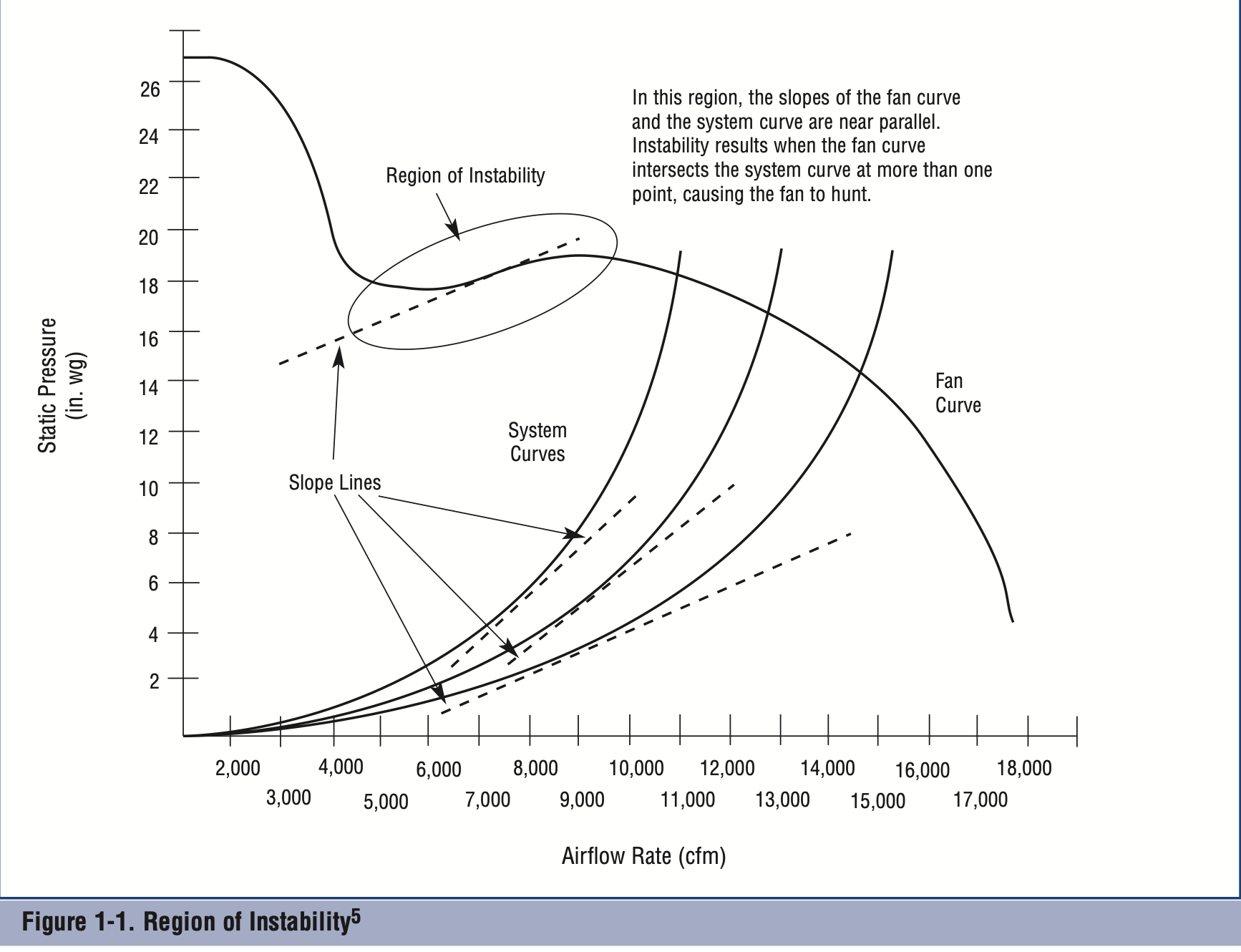
But then looking at it again, I realized that the RPMs are working at 100% - that means that we aren't even close to that region - so I started reading more and hit the part of the guide where it talks about design practices of ducts for improved efficiency.
I learned that axial fans work the most efficiently when the input and the output have uniform distribution of air pressure.
So I decided to first fix the output, by making the output air uniform and properly flow without collision and into the right part of the system for the cooling to be maximum.
(Just because if the air is already moving in one direction and not many ways in the box, it should enter the fans pretty uniformly. So I disregarded input entirely.)
So at this point, I've been switching between the motherboard's internal temperature sensors and the guide, which actually brought me to the next part.
The "Missing" Puzzle Piece
As I sat in front of the temperature screen…
I saw a term called FSC_index.
If you search up the meaning of FSC_index, it means:
Fan Speed Control Index
It also had a temperature as its gauge.
But as I learned that it was something to do with the fans, I dug deeper into the subreddit posts to find the missing piece…
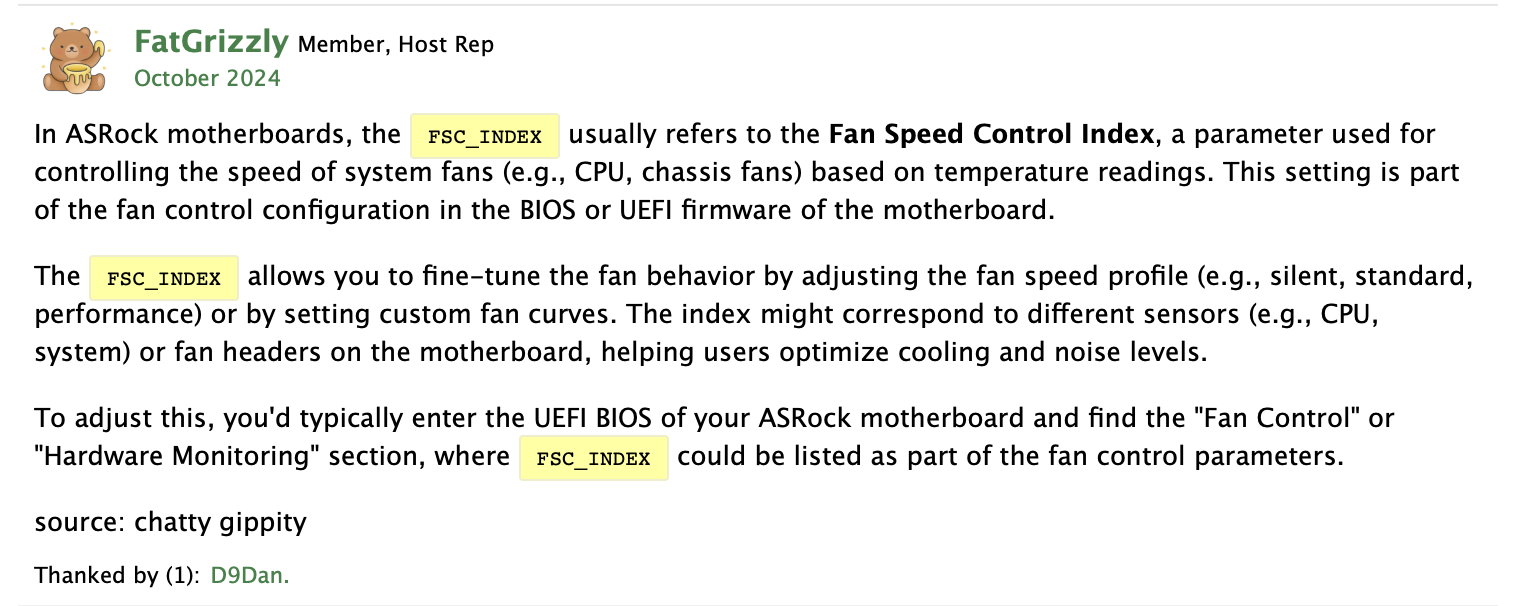
Thanks to FatGrizzly's post explaining FSC_index, it explained what I was missing.
In simple terms, it takes all the parts of the motherboard that are the most important and monitors all of their temperatures and their set critical temperature.
And pretty much the part that is closest to its critical temperature, or has hit its critical temperature - that's the one that controls the speed of the fans.
- If the CPU was the closest to its critical level, then it would be the one controlling the speed of the fans.
- If RAM was the closest, it would gauge the fans' speed.
- If VRM was the closest, then it would take over the fans.
And so on.
So the temperature that was showing was a specific temperature of a specific motherboard part that was currently controlling the speed of the fans.
So I got into digging further to figure out what specific part was currently in control, because it wasn't the initially thought CPU.
CPU temperature was at 77 and the Index was showing 79. Plus, the critical temperature for the CPU is at 98 degrees Celsius.
So no way the CPU temperature is the issue.
Then I started looking around to find what parts are taken into account for the FSC_index (which ones are the most important).
The parts I found were:
- CPU temperature
- VRM (power delivery) temperature
- SoC / chipset temperature
- DIMM (RAM area) temperature
- Motherboard ambient sensors
- Sometimes NIC / PCIe area sensors
- NVMe area
All of the temperatures except 2 were showing as their own sensors, and all of them were under the critical temperature.
The VRM was not its own sensor, and neither was the SoC chipset.
I focused on the VRM just because it was away from my actual understanding of the SoC.
And the interesting part was that VRM was right next to the fans…
Though I learned that there could be like a no-air bubble, where all the air just goes over it without actually cooling.
But because SoC and VRM are in the same direction, the next idea was to create a proper air path or duct that will be directed to cool those parts.
Duct Work
As I kept moving down this guide, I found more and more interesting ways to control the air.
How to keep it stable, uniform, and not colliding for minimal air pressure changes.
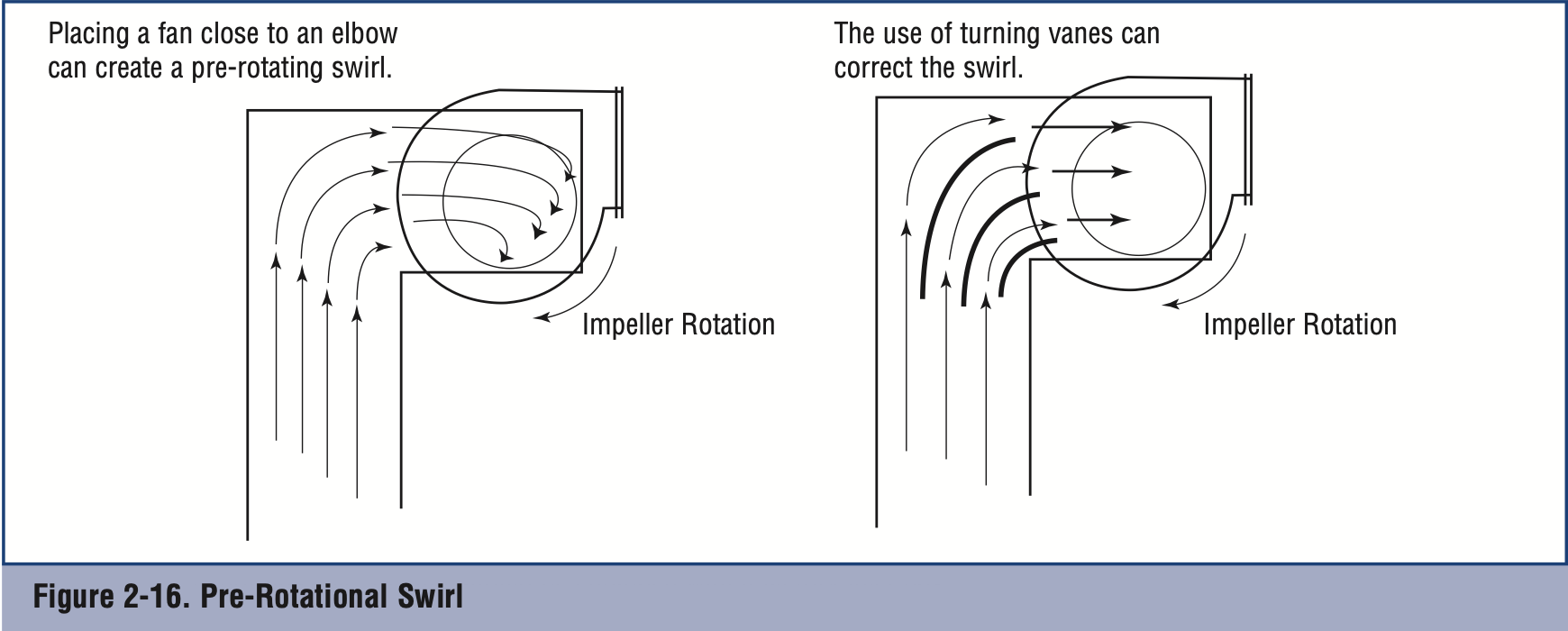
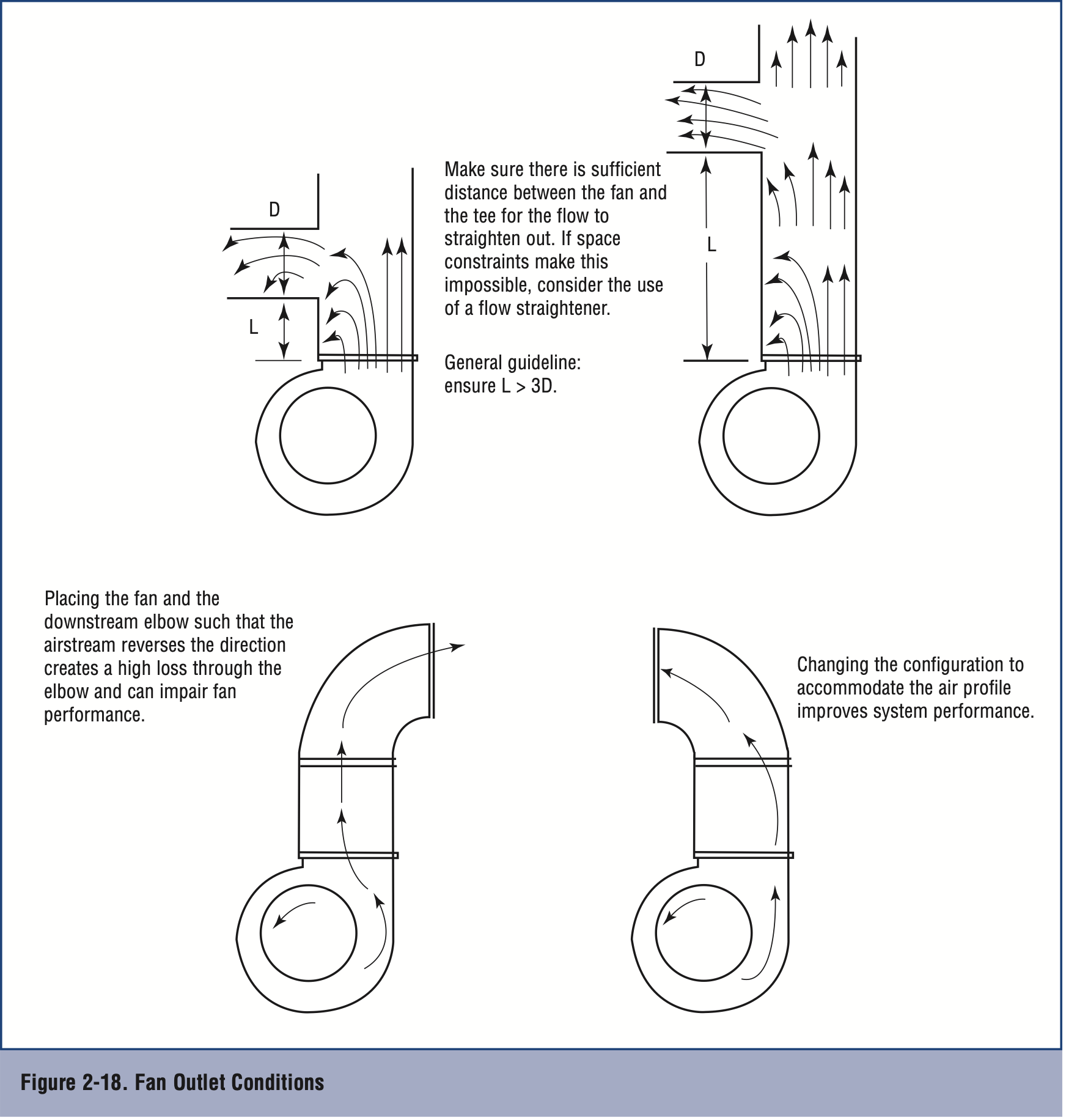
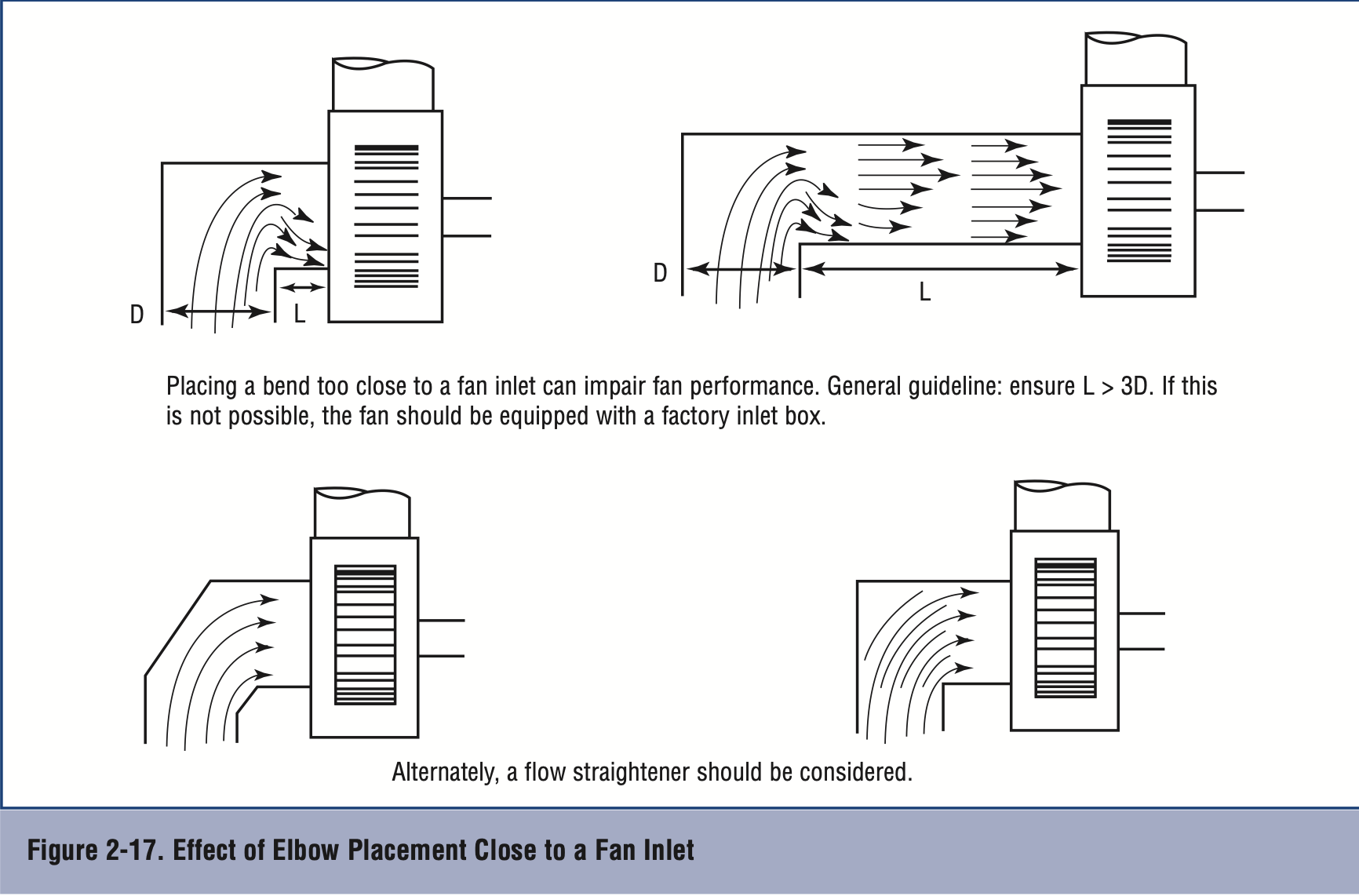
There are many things to keep in mind, and crazy math that I could have done to make a PERFECT duct.
But I decided to stick to the basic ones, the ones that literally keep uniform airflow.
These were the ones that I chose:
- Have small fins that kind of split the air into small groups and move in the same directions
- Everything has to be smooth, no straight corners, and every corner needs to have guide rails
- Each fan must have, from the start, guard rails to keep the output of the air pressure uniform without colliding from the start
- Everything enclosed well to keep the space tight, no air leaks
This is what I took to create my first prototype.
First Triple Fan Prototype
As a collective, to not waste much resources, we decided to create the first prototype out of cardboard.
Not a stiff cardboard because the bends would be too strict, but rather a more flexible one so that everything is smooth.
Build started with 3 middle fans combining into one stream smoothly to create a very steady flow of cooling to VRM and CPU.
Following the rules of duct, I was able to create this:
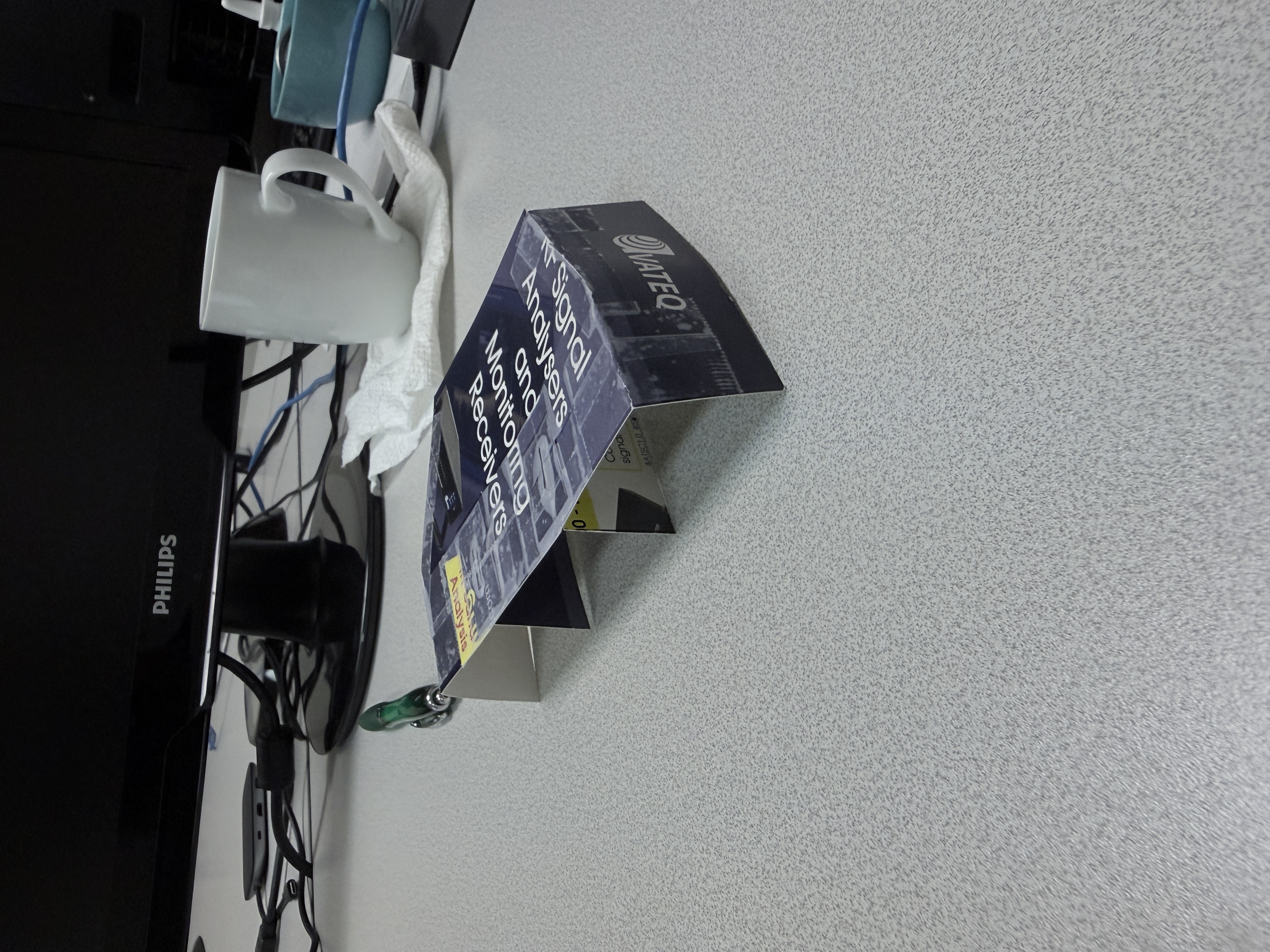
We attached it to the fans and closed it to see the difference.
The results were shocking…
Initial feel test - the output airflow, for the first time, actually felt warm!
That means the airflow indeed was cooling the CPU and VRM.
But that's not it.
CPU and FSC_index both dropped by 6 degrees!
And sound by 5dB!
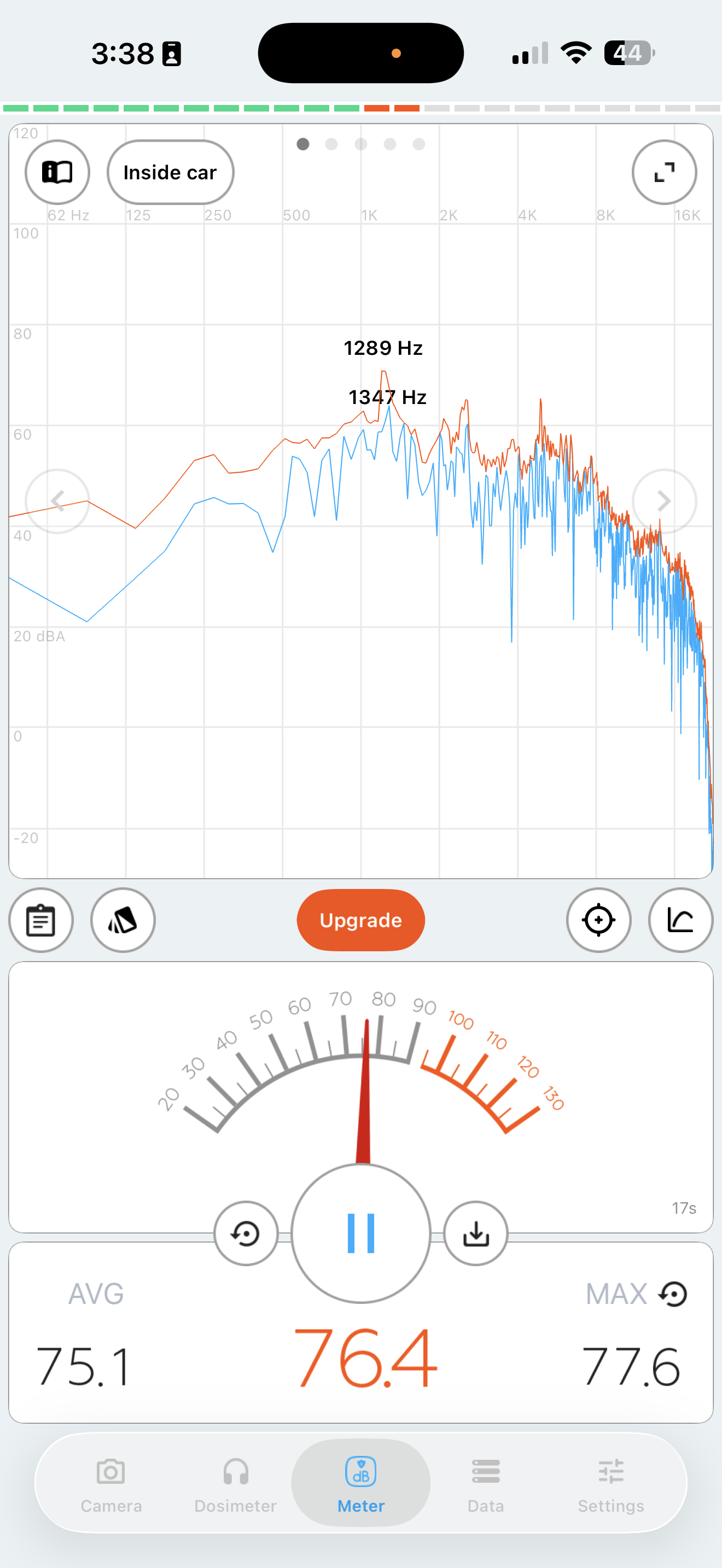
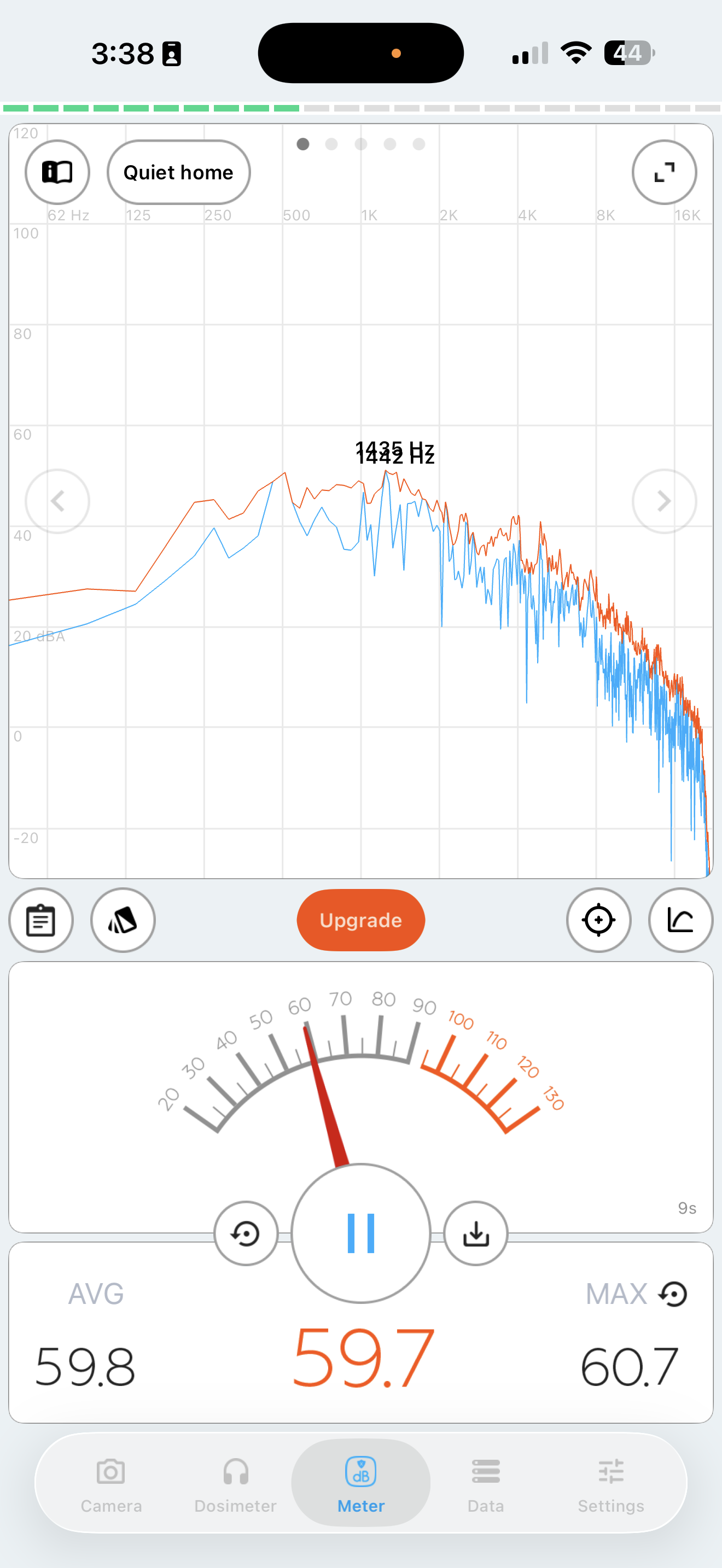
Sound measurements after triple fan duct. Left: right next to system (~72dB avg, down 5dB). Right: 2 meters away. Measured with Decibel X app.
To be honest, I don't know if it was placebo, because the thin cardboard attached by tape and covered with the actual cover -
For sure must have been flying inside, opening air gaps.
Or maybe this just shows that without air gaps we might see better results, and in general we solved our problem!
Though a co-worker suggested creating another prototype with fewer fans in the duct - it might help us understand if a single properly ducted fan could outperform multiple combined fans.
Which I read that it could.
First Double Fan Prototype
Designing became fun.
The steps of creating a proper duct were in place.
Just had to be done.
Same procedure,
Just with 2 fans.
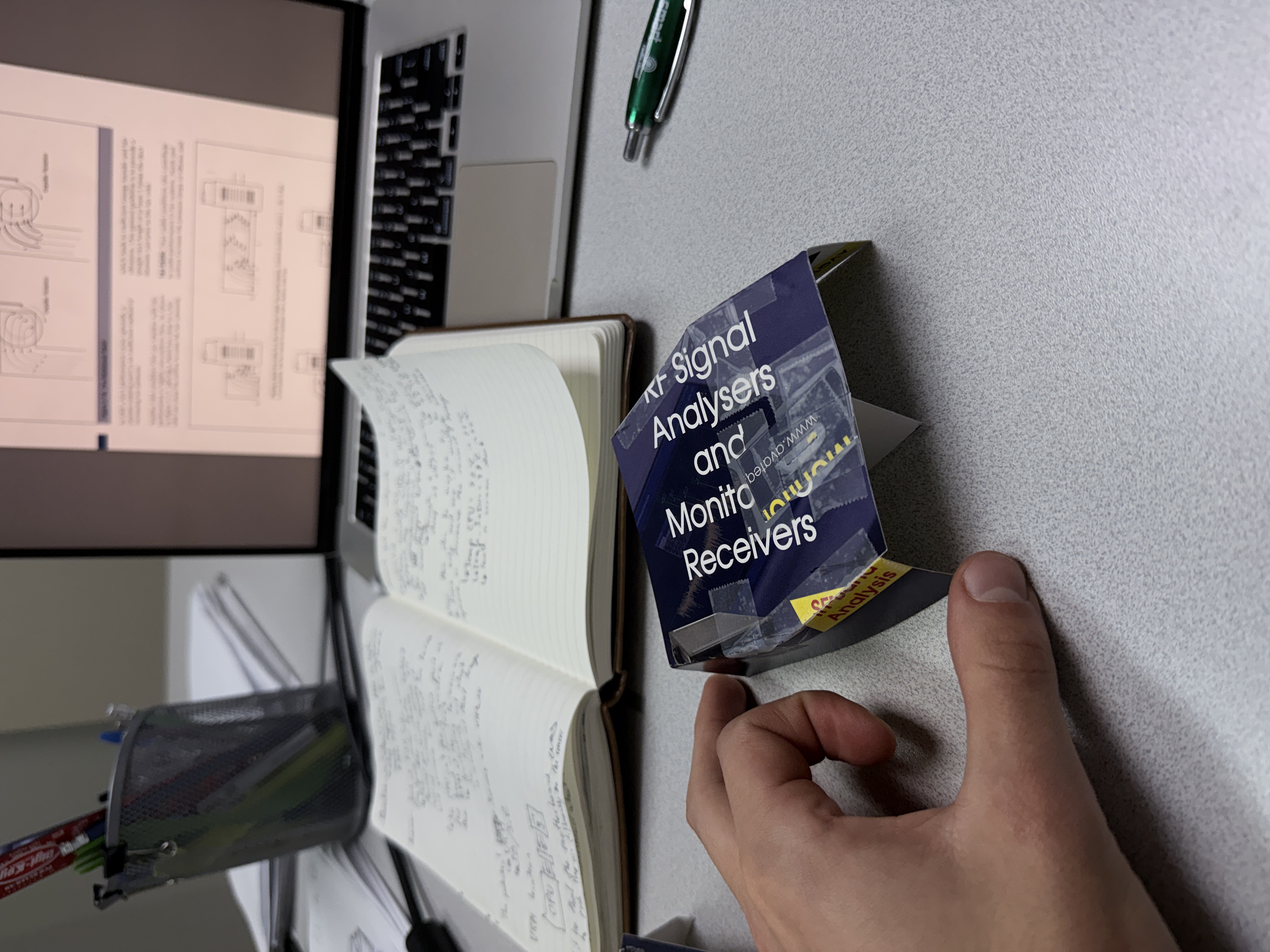
The results weren't what we expected.
It didn't perform as well as the triple one with the cooling.
The temperature of the CPU dropped to 73, and the dB didn't drop much either.
So the final decision was to stick with the triple fan design.
But this time, a second prototype - to 3D print it, with all proper measurements to make sure that there aren't any leaks.
But that's for Part 2, as I haven't started working on that yet.
My Opinions/Thoughts
Now let's circle back to everywhere I said "I'll explain my predicaments later."
This is the part.
Starting off, let's talk about all the values that I had to look at to actually create something that maybe was the solution (we still don't know fully).
At the start, we just took the CPU temperature and the RPMs.
But now I can fully say that not only does CPU matter - FSC_index is what you need to look at. Also the size of the fan, heatsink fins, heatsink material, damn near even the fan material.
In simple respects to all my aerospace engineers, or those who work with aerodynamics.
Second off, the reason why I believe putting lower RPM fans dropped CPU temperature rather than increased it.
Now that I've learned that steady/uniform airflow is more important for cooling than just pushing a ton of air somewhere,
I can guess it's because with higher RPMs, the output of the pressure was fluctuating much more.
In simple terms: if we grab 2 big waves and hit them together, the constructive wave will be MUCH larger.
And if we grab 2 smaller waves, it will be much smaller.
So with bigger fans, the "turbulence" was much larger, creating that unsteady airflow.
Which caused less air to pass through the fins of the heatsink, which created less cooling.
Lessons I've Learned
Let me say this off the bat:
I am no aerospace engineer. I don't deal with any of this.
I could be totally wrong about everything I wrote in this blog.
But these are my actual thoughts and understanding that came to me as I was digging up and reading up the internet and this playbook/guide.
But here are the lessons:
1. Do more than think.
I think if I just started building faster without dealing with all the calculations, or my own guesses, I would have gotten to the prototype creation faster. Though I have to say I did learn (I think) a thing or 2 about aerodynamics.
2. Having understanding (even a little) about congruent systems helps A LOT.
I don't know if I phrased it right, but this really made me think about how much we get distracted on one specific task or work and become really good at one thing, but then when needed for others, we can't do it. If I had known about computers and all the different indexes, maybe this process wouldn't have been so hard. In simple terms: there is so much to learn. Keep growing and learning the things you specialize in, but go out there and try new things, learn things - and I think most things will become a little less hard or more common sense.
3. Ducts are IMPORTANT.
Never have I thought (well, only cars - I knew aerodynamics are very important there) that systems, even the smallest ones, need very good cooling. And with a proper duct, it becomes so simple to mitigate so many issues. Temperature, noise, cost cuts, efficiency - everything just better. So maybe take a look at your system. Maybe it will become better with better cooling.
I think I'll end off here.
Email me about my mistakes, or maybe something else to learn about. I'll be happy to learn.
Keep learning.
Keep growing.
Keep building.
Till Next Time!
George Babakhanov
Student for Life
Credits & Resources
- NREL's Improving Fan System Performance Guide - The primary resource that helped me understand fan systems and duct design
- FatGrizzly's explanation of FSC_index - The forum post that helped me understand the Fan Speed Control Index
- Decibel X App - The app used to measure sound levels