How AI Coding Agents Are Making Developers Dumber (And How to Actually Use Them Right)

New here?
Hey, I'm George. I'm an Electrical Engineering student who started coding at 18 with ChatGPT doing most of the work. I've since built everything from no-code automation pipelines to ERP systems to RF signal analysis tools. Along the way, I learned the hard way that AI can make you faster and dumber at the same time. This post is about what Anthropic's research says, how I lived it, and the workflows I use now to actually grow with these tools instead of leaning on them.
Let's get into it.
The Paper That Should Scare Every Developer
Anthropic published something in January that every developer using AI needs to read.
"How AI assistance impacts the formation of coding skills"
So here's how the study worked.
They got 52 mostly junior software engineers. All of them had been using Python at least once a week for over a year, all at least somewhat familiar with AI coding tools. But none of them had ever used Trio, this specific Python library the whole study was built around. Trio deals with asynchronous programming, the kind of thing you'd normally learn on the job, not in a classroom. Realistic stuff.
The study had 3 parts. First a warmup. Then the main task: build 2 features using Trio. They told participants a quiz would follow, but encouraged them to work as quickly as possible. The coding task was designed to mimic how someone might learn a new tool through a self-guided tutorial. Each participant got a problem description, starter code, and a brief explanation of the Trio concepts needed to solve it. Everyone used an online coding platform with an AI assistant in the sidebar that had access to their code and could at any time produce the correct solution if asked.
The third part is where it gets interesting.
Everyone did a quiz with NO AI allowed.
And the quiz wasn't just "write some code." The researchers designed it around 4 specific skill dimensions:
- Debugging … can you find and diagnose errors in code? This is critical for catching when AI output is wrong.
- Code reading … can you read and actually understand what code does? Essential for verifying AI written code before you ship it.
- Code writing … can you write or pick the right approach? (The researchers noted that low level syntax recall matters less now, but high level system design matters MORE than ever.)
- Conceptual understanding … do you understand the core principles behind the library? Do you know if the AI is even using it the way it was meant to be used?
The quiz weighted debugging, code reading, and conceptual questions the heaviest. Because those are the skills you need to oversee AI generated code. Not just use it.
The result?
AI group scored ~50%.
Group without AI scored ~67%.
That's a 17 point gap. Almost 2 letter grades. Gone.
And here's what makes it even worse. The AI group barely finished the task faster. 2 minutes on average. Not statistically significant. So they didn't even get the speed benefit that everyone always uses to defend AI.
The worst part? The biggest gap was in debugging. The EXACT skill you need most when AI is writing your code.
The issue… cognitive offload.
Cognitive offloading is a psychology term for something we do naturally all the time. It's when you shift a mental task away from your brain and onto something external. Writing a grocery list instead of trying to remember it. Setting a phone reminder instead of keeping it in your head. Your brain decided the effort of holding that information wasn't worth it, so it handed the job off. That's offloading.
The problem isn't the act itself. It's when you start offloading things you actually need to learn.
According to a 2025 review published in Nature Reviews Psychology, if you unexpectedly lose access to what you offloaded, you perform worse than if you'd never offloaded at all. (Richmond & Taylor, 2025 - full citation at the bottom)
And the worst part… most of us are doing it constantly without even realizing it.
But I want to be clear about something before we go further. This paper is not saying AI is bad. The same Anthropic research team has studies showing AI can speed up tasks by 80%. Other researchers found GitHub Copilot made developers 55% faster.
The key word is "tasks" where they already had the skills.
AI accelerates what you already know.
It stunts the development of what you don't.
That's the distinction that matters. And that's exactly what I didn't understand for a long time.
How I Learned This the Hard Way
Let me tell you my story, because I've been on both ends of this.
I was 12 years old, sitting across from my father on our couch, staring at a half built tic-tac-toe game in some IDE I didn't care about. He was trying to teach me to code. We went through tic-tac-toe, Battleships, even started chess. Every single one went nowhere. I'd fall asleep at the keyboard. The logic didn't click. The debugging felt like punishment for a crime I didn't commit.

After a few weeks of this, I made my decision.
Coding just wasn't my thing.
Closed the laptop.
Done.
That was my normal for years.
Fast forward to grade 12. ChatGPT hit like a truck, and I was in IB.
(BTW Fun fact Probably the only person in the history of that school to actually fail it haha)
25 page essays about books I hadn't read, physics labs I didn't care about, chemistry reports that existed purely to torture teenagers. So of course I started using ChatGPT. Even the early versions we're good enough. Give it the task, check on it while doing something else, come back at the end and clean it up.
It became a habit fast.
New work? ChatGPT.
Freelancing marketing job? ChatGPT.
Ideas? ChatGPT.
Nothing felt hard anymore. Everything felt easy.

And I thought that was a good thing.
Then came the marketing client in my first year of university. I needed Instagram data, specifically which video formats we're actually getting views. I wasn't going through thousands of videos by hand. So I started searching for a tool, found N8N (a no code automation platform), and because I'd absorbed enough code over the years to not be completely lost, the visual data flow made sense to me. I built the full pipeline in a weekend. It collected data, sorted it, analysed it, recommended a viral format. All automated.
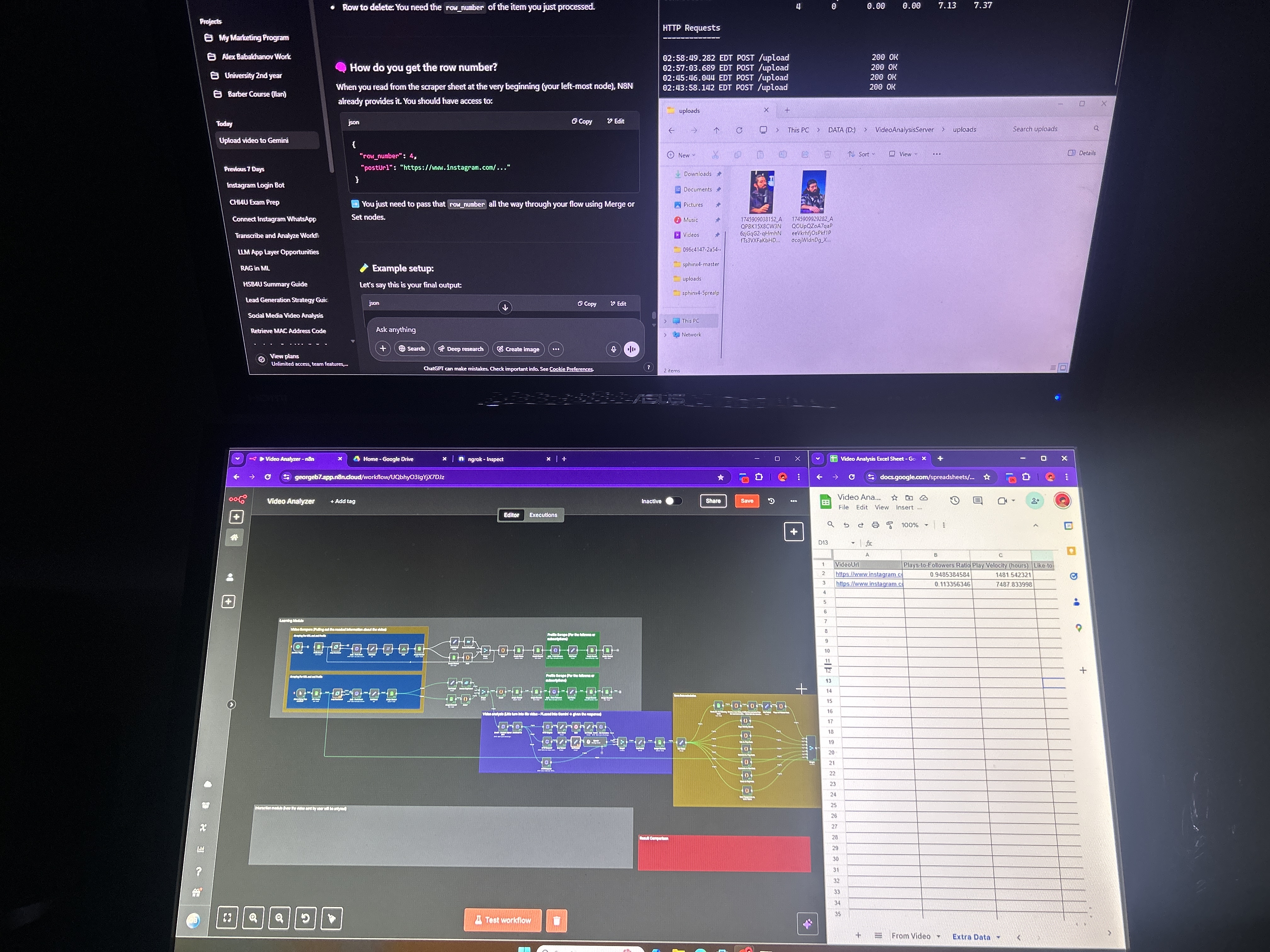
I sat back and looked at the screen.
"If this is this easy, why don't I just automate my whole life?"
So I did.
Gmail draft reply system. RAG pipeline for my school slides. Automated video scripting.
I even turned my open book assembly exam into a vector database and let the system answer it while I watched. I only answered 2 true or false questions it flagged as uncertain.
(If my prof is reading this… I'm sorry. But honestly, the learning curve was worth it. I learned more building that system than I did in the entire class. <3)
But something started bothering me. Quietly. In the background.
The bigger my N8N projects got, the longer the JavaScript nodes got inside them. I'd ask AI to write a 200 line parsing function, it would work, I'd copy it, paste it in… and I had no actual idea what was happening inside it.
N8N had its limits too. The if statement nodes were a nightmare. The HTTPS requests didn't always support what I needed. The nodes were like a cage. Either you use it the way they wrote it, or you don't build your system.
And the more time I spent there instead of actually coding, the more I felt like I was falling behind something I couldn't name yet.
So I cancelled my N8N subscription. Exported everything to GitHub. And made a decision.
I took CS50x from Harvard and deliberately didn't use AI for any of it.
Started with C.
Painful. Confusing. The kind of painful that ruins your afternoon when you get a segfault and don't know why. But it taught me what memory actually is. What a pointer does. Why stack overflows happen. That foundation made Python feel like cheating afterward. Combined with Leetcode grinding, I started actually feeling like a developer.
I opened PyTorch to rebuild a transformer from scratch. Got completely lost. But instead of asking AI to build it for me, I asked it to explain individual functions. Then I'd try to rebuild them myself. Then ask more questions. Day and night.
I moved through LangChain and LangGraph the same way. Not "build this." But "explain this, how does it work, how would I rebuild it without the library?"
That's where the real growth was.
And then I joined Avateq Corp. Started as a marketer. Shifted to building a small ERP system to track company resources. Real expectations. Real deadlines. Real pressure.
And the moment I was in that environment…
I went straight back to full AI delegation.
Building features fast, everyone shocked at the speed. And when someone asked me how I built something, I'd pause. Not because I was hiding it. Because I genuinely didn't know.
I couldn't explain my own code.
One afternoon a senior dev asked me to walk him through a module I'd shipped the week before. I pulled it up. Stared at it. Started explaining, got halfway through a function, and stopped cold. I wasn't sure what it was actually doing. I said something vague and changed the subject. He nodded and walked away.
I sat there for a long moment, looking at the screen.
That's when I understood what I'd been doing.
Not building.
Outsourcing.
The whole time, I thought I was developing. I was just transcribing. The AI had the understanding. I had the output. And output without understanding is just a liability waiting to surface at the worst possible moment.
That's the trap. That's what Anthropics paper is describing. That's the thing nobody warns you about when they hand you the tool.
I didn't know what to call it then. I know now. It's cognitive offload. And I'd been doing it since I was 17, starting with a French essay in grade 12 and ending with a module I couldn't explain to the person standing next to me.
After that moment, I started using Claude Code and I started using agents differently. Deliberately. And through a lot of trial, error, and some good people pointing me in the right direction… I believe I've found what actually works.
How to Actually Use AI Agents to Grow, Not Shrink
Let's get into it.
This is what changed everything for me, backed by both Anthropics research and practitioner wisdom from people like Silen and David. (Silens blog on Claude Code is essential, linked at the bottom. Both of their socials are down there too.)
Start With Low Level Code First
Before you touch any AI coding agent, here's what I wish someone told me at 18.
Learn C first.
Not assembly (that is too low), though I think it's important and not python (that is too high). C. It's painful. It hurts. You will want to quit at least once a week. But it will save you hundreds of hours later and give you something no AI can give you… an actual mental model of what's happening under the hood.
When you understand what a pointer is, when you've had a segfault ruin your afternoon for the first time, when you've manually managed memory… Python becomes obvious. And when an AI writes you a complex function, you can actually read it and reason about whether it makes sense.
CS50x from Harvard is free. Start there.
The Anthropic paper confirms this. The biggest gap between AI users and non AI users was in debugging. Not code writing. Debugging. The skill that requires understanding what the code is ACTUALLY doing, not just what it outputs.
You can't debug what you don't understand. And you can't understand what you never learned.
Anthropic Found 6 Patterns. 3 Kill You, 3 Save You.
This is the most actionable thing from the paper. I realized this on my own before reading it, but I just couldn't explain it as well as they did.
They annotated every interaction the AI group had and found 6 distinct patterns.
The 3 that killed learning:
- Full Delegation - "Do everything." Finished fastest. Learned almost nothing.
- Progressive Reliance - Started reasonable, slowly handed more and more over. Got to the end knowing less than when they started.
- Iterative AI Debugging - Used AI to fix every error rather than understand the error. Slower AND worse scores.
The 3 that preserved learning:
- Conceptual Inquiry - Only asked "explain this to me" questions, then wrote the code themselves. Fastest of the good patterns.
- Hybrid Code + Explanation - Asked for code AND explanation, then actually read the explanation.
- Generate Then Comprehend - Let AI generate the code first, then asked follow up questions to fully understand it. Nearly identical workflow to full delegation, except for one step: they used AI to check their own understanding afterward.
One extra step. That's the whole difference.
Every time now, after the whole Avateq experience, when I'm about to ask Claude for something, I ask myself…
"Am I just letting the AI do it for me, or am I genuinely trying to learn?"
This right there changes everything.
The prompts become more concrete, more questions, more comments in the code, more thoughtful about the full pipeline… It just changes right away into something that differentiates you from other developers.
And I'll tell you this right now. Since I started doing this, I've been learning things at a higher rate AND I already use this knowledge to consult other companies. Don't forget I started coding at the age of 18.
If you read this blog and forget everything else… just remember this one question to ask yourself every time you hit send on a prompt.
That's it.
The Triangle of Needs for AI Development
In life, you need air, water, food, shelter, sleep.
In the AI development game, there are 4 things you need to actually grow with these tools rather than become dependent on them:
- Low level understanding - know what the code is actually doing
- High logical mindset - architect systems, think in cause and effect
- Tons of visualization - see the data pipeline before you build anything
- Rich, specific context - the AI is only as good as the context you give it
Miss any one of these and your AI assisted development starts falling apart. The first 2 come from you. The last 2 you can build systems for.
Now how do you actually build low level understanding and a high logical mindset?
I'm going to sound like a paren't here, but all our paren'ts are right about this first one…
Math and Physics.
Solve math problems. Learn how to break big equations down to basics, then logically combine them back into a solution. This really teaches you how to build something from the ground up, which is exactly what system design is. I try to practice this every month by rebuilding some math or physics equation from scratch.
4 months ago it was barcode scanners (blog coming soon). 3 months ago it was the FSPL and Hata-Okumura models [Read Part 1]. 2 months ago it was the ITM model, an extension of FSPL that's much harder mathematically, and in Part 2 you'll see how the low level knowledge I'd built actually let me improve the model itself [Read Part 2].
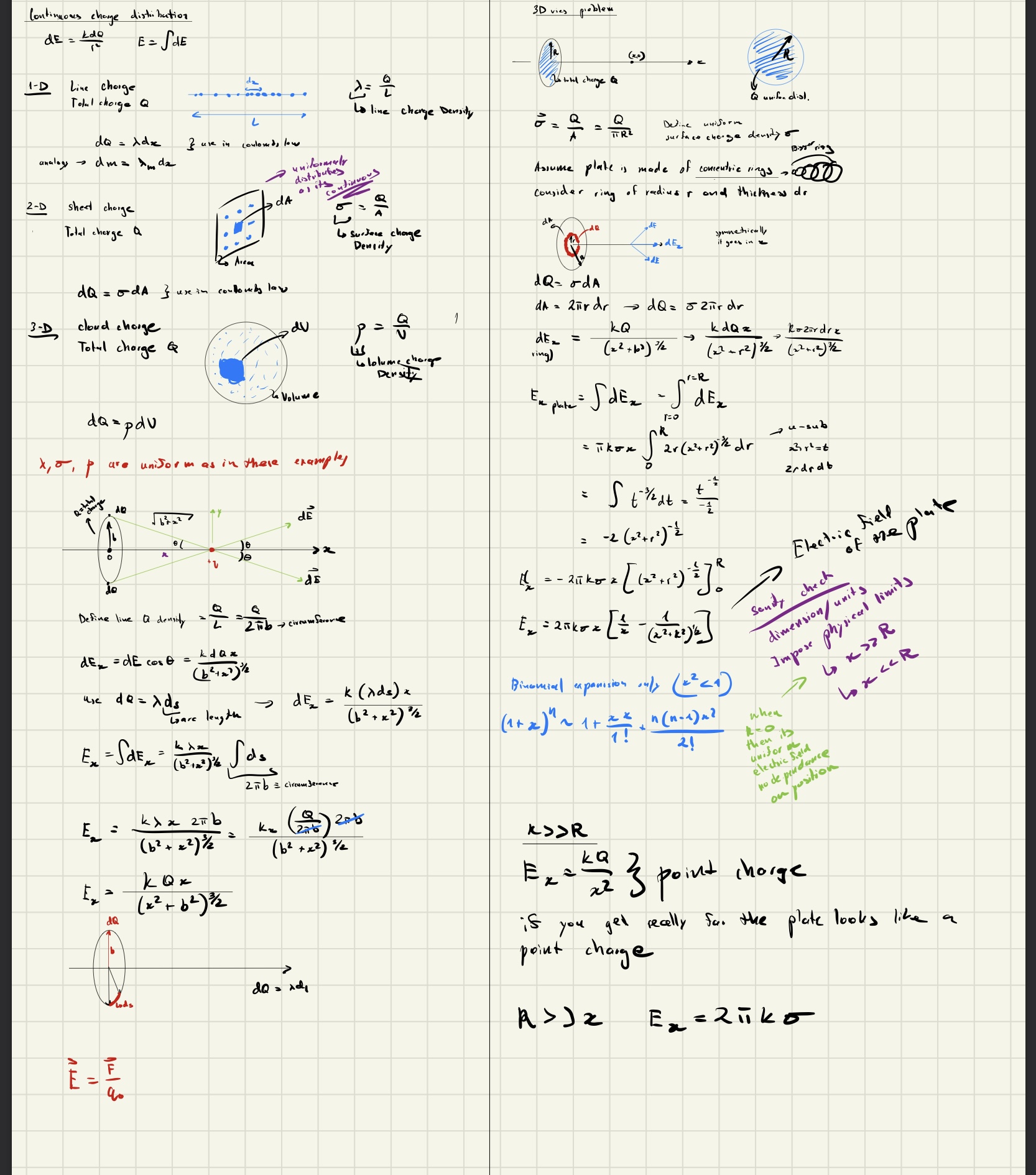


This is what building low level understanding looks like. Hand calculations, not prompts. Once you've done this, you can actually tell when an AI gets the math wrong.
Reverse engineer everything. As you walk around, look at things that are already built and mentally break them down to basics. Then mentally rebuild. It costs nothing and trains your brain to see systems.
Leetcode. As geeky as it sounds, one of my good friends David Sagalovitch, works at Qualcomm, knows C code by heart, builds crazy systems, gave me this advice once while we we're working out:
"Solve 5 to 10 Leetcode problems a day. If the solution doesn't come to you in the first minute without writing code, look at other peoples solutions and rebuild it while learning."
What hes saying is that Leetcode isn't really about practicing code. It's mostly about logical thinking. If you can mentally create a solution fast for hard Leetcode problems, you're a highly logical person. And if you need some work there, just do that for a little while and you'll see improvement.
Davids socials are linked at the bottom.
CLAUDE.md Is Not Just One File
If you're using Claude Code, you NEED to update your CLAUDE.md. That's not a debate.
But here's where most people stop.
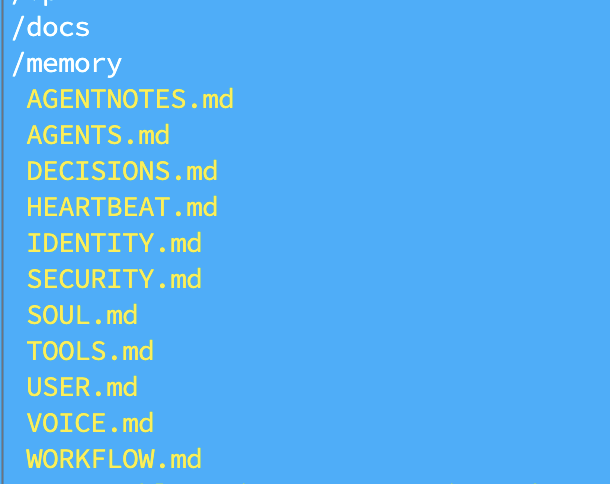
CLAUDE.md should be the entry point. The actual information lives in separate, focused files that CLAUDE.md references:
errors.md- common errors specific to this project and how to handle themarchitecture.md- full topology of the system, how everything connectsresponses.md- how Claude should explain things, what level of detail, what formatuser.md- who you are, how you think, how you like to work (more on this later)
Then CLAUDE.md points to all of them.
A bloated single CLAUDE.md becomes unmanageable fast. Separate files let you update one thing without touching the rest. And they let the agent find exactly what it needs quickly, which matters a LOT given that every token of context it wastes searching is a token it's not using to build.
Understand this. Claude Code is probably the only agent built around this philosophy entirely. Their whole approach to coding is based on folders and files, the topology of the codebase, and context pointing. Being able to point properly to the right locations is very important and will help a ton.
So split your files for different cases, create files about how you want it to communicate, point them in CLAUDE.md, and don't just bloat it with everything. Make it organized.
Give Every File a Header That Explains Itself
This one sounds small.
It is not small.
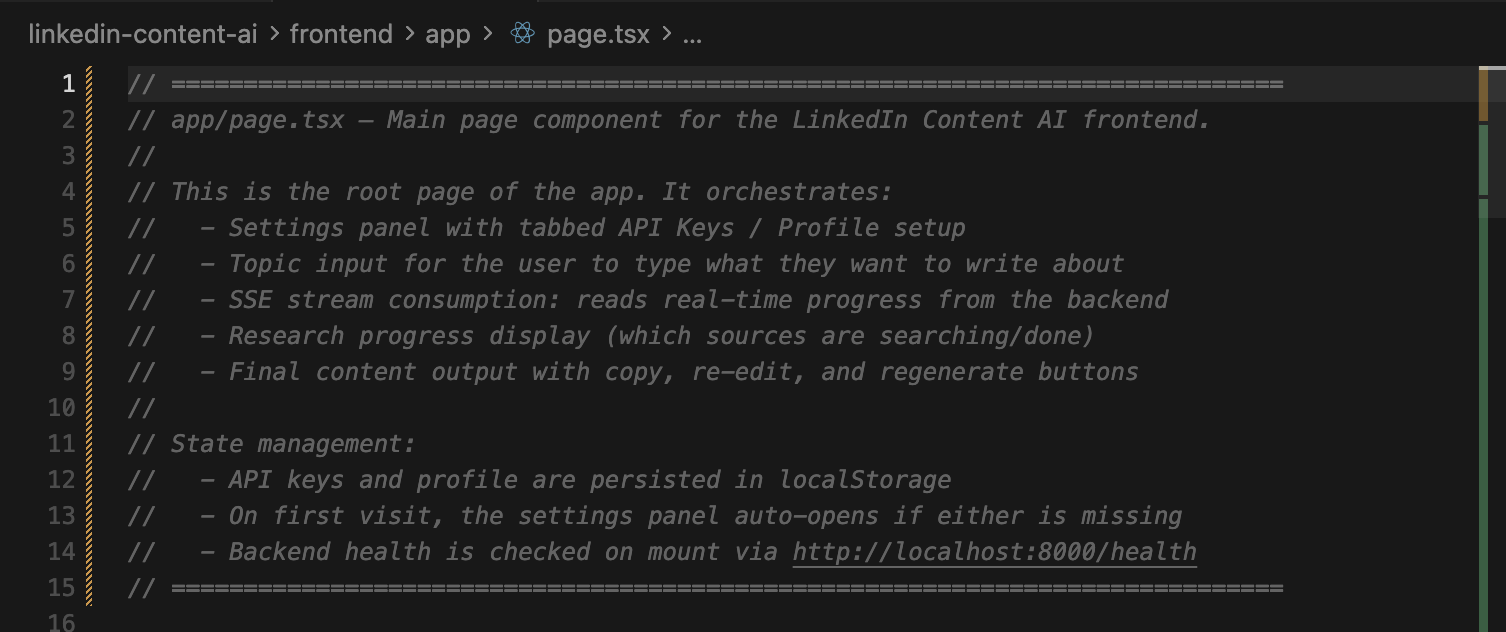
It ties directly back to the point about topology. At the top of every significant file, I write a comment block, usually covering the first 50 to 100 lines, that explains what this file is, what it does, what it imports, what it exports, and where it fits in the system.
Why?
Because when Claude Code is searching your codebase for relevant context and building its mental map of the topology, it reads the top of each file first to decide whether to read deeper. If the first 100 lines tell it everything it needs, it navigates faster and uses less context window.
And yes, Claude Code now has a 1M context window, and they've solved a lot of the context management issues with compaction and more. But less used context means better performance. A well oriented agent won't hallucinate and will have a clean, specific context to work from.
Don't wait for 100% context used. Most of the time it starts losing its understanding well before that. Compact it and keep going. Split your learning context and your working context into 2 separate agents. Make each context window specific to what you actually need.
I've found the header strategy cuts context search time noticeably. And it forces me to think clearly about what each file is supposed to do. Which is useful in itself.
Your user.md Is the Most Underrated File You're Not Writing
Every Claude project I work on has a USER.md file.
It explains who I am. How I like to learn. That I'm a visual person and need to see the data pipeline before any code gets written. That when you introduce a new library or function, I need you to explain what it does under the hood, not just use it. That I'll ask a lot of questions and that's not a problem, it's how I work.
Here's what's literally in my USER.md right now:
"I am a suspicious person. I will ask tons of questions to understand your code. When introducing new libraries and new functions, explain them to me, explain why they are used and the low level code, so that I have a full grasp of what it does."
That one instruction changed how Claude interacts with me completely. It stopped just handing me code and started teaching me alongside building.
This user.md gets referenced by every projects CLAUDE.md. So every session starts with Claude already knowing how I think and what I need.
And by the way, building this file doesn't have to be a long manual process. I collected screenshots, work projects, texts I wrote, added my own needs, and then asked an LLM to use all of that data to build a user.md that captures how I communicate, how I think, and what I need from an agent. That initial work takes some time. But if you want to stop falling behind, learn to use your brain to build the systems that help your brain.
ASK DAMN QUESTIONS
People might think you're weird for asking an AI to explain itself constantly.
Do it anyway.
Every new library, ask what it actually does. Every function you don't recognize, ask how it's built. Every architectural decision, ask what the tradeoffs were.
You are not here to use the AI. You are here to grow with it.
There's a difference.
The Anthropic paper calls the developers who did this the "Conceptual Inquiry" group. They asked the most questions. They scored the highest. And they finished the fastest.
Curious beats fast. Every time.
The Scaffolding Method (Thank You Silen)
This one came from Silen directly, and it's become one of my most used workflows.
Silen is an ex-YC founder (Stackwise, W24) and was a Founding AI Engineer at AutoGPT. I've genuinely never talked to anyone this advanced in AI and building agents. But back to the topic...
Anything I don't know how to build, I don't ask Claude to build it. Not yet.
I open a blank file and write out how I would build it. Just comments. No code. Top level structure, main functions, what each piece is responsible for, what questions I have. Takes maybe 15 to 20 minutes.
And here's why that 15 to 20 minutes matters more than most people realize…
1 minute of planning saves 3 minutes of debugging.
Write down what you're building. What it connects to. What it should NOT do (this one is critical, Claude loves to overengineer). What success looks like.
Silen puts it simply: your time spent planning is directly proportional to your agents output.
I'd add… it's also directly proportional to how much you understand of what gets built.
Part of that planning is visualization. Before any new system, before any new feature, I draw the data pipeline. Not code. Not pseudocode. A visual. How does data come in? How does it move? What transforms it? What does the output look like? It can be a sketch on paper, a quick diagram in a comments block, anything.
The point: if you can't visualize the system, you're not ready to build it.
And if you can't explain the data flow to Claude, you can't expect it to build the right thing.
The best sessions I've had with AI coding agents started with me sharing a clear data flow. The worst ones started with "I need a system that…" with no map.
Then I take the full scaffolding, plan, data flow, questions, to Claude and have a conversation about it. Not "build this." But "here's how I think this should work. What do you think? Where am I wrong? What am I missing?"
Claude doesn't write the code in this phase. I do.
But Claude guides the architecture, points out edge cases I missed, explains the tradeoffs of the approaches I'm considering. The back and forth is genuinely useful.
By the time I actually start writing, I understand the system. I built the mental model. The code that comes out is code I can explain, debug, and extend. Because I designed it.
Why I Cancelled Cursor
I was a Cursor user for a while. And I get why people love it.
But I cancelled, and honestly it made me a better developer.
The tab complete was the problem. Not the feature itself. The habit it created.
I'd be typing, a suggestion would appear, I'd tap tab without really reading it. Then again. Then again. Long lines of code would scroll past suggestions I never actually checked. And when something broke, I had no idea which auto accepted suggestion caused it.
The worst part: when Cursor show's a multi line suggestion or a suggestion on a long line, it blocks your view of the code underneath. And you can't scroll to see what's past your screen or the file edge, because sometimes the suggestion extends right through it.
So you just tap tab on your keyboard and hope.
That's not coding. That's outsourcing your typing.
Since cancelling, I write easy code fixes myself. Slower, yes. But I know what I wrote and why. When something breaks I have a real starting point.
I still use Claude Code constantly. But as a dialogue partner, not an autocomplete machine for simple code lines. That's just wasting the context window.
The thinking stays mine.
The Real Lesson
Anthropics paper found one thing above all others that separated the developers who learned from the ones who didn't.
It wasn't the tools. It wasn't how often they asked questions.
It was cognitive engagement.
Were they thinking while using the AI, or were they outsourcing the thinking to it?
The developers who grew used AI to understand, explore, and verify. The ones who atrophied used it to skip.
Every technique in this post is about keeping the thinking yours. The scaffolding method. The file headers. The question asking habit. The planning before prompting. The CLAUDE.md system. Writing your own code without autocomplete.
None of these slow you down. They actually speed you up. Because you understand what you're building.
The developers who are going to win in this era aren't the ones who prompt the fastest.
They're the ones who think the clearest.
AI is the best teacher I've ever had.
But only when I stayed in the room.
To summarize everything:
- Learn low level code first (C -> Python, not the other way around)
- Ask yourself before every prompt: am I delegating or am I learning?
- Build your Triangle of Needs: low level understanding, logical mindset, visualization, context
- Split your CLAUDE.md into focused files. Topology matters.
- Header every file so your agent knows exactly where it is
- Build a user.md. Make the agent understand YOU.
- Ask damn questions. Every library, every function, every decision.
- Scaffold before you build. Plan, visualize, then converse.
- Cancel the autocomplete. Write the thinking yourself.
Have questions? Want to chat?
I'd love to hear from you. Reach out on any of these:
Keep learning.
Keep growing.
Keep building.
George Babakhanov
Student for Life
People Mentioned
Research & Blog Citations
- Anthropic Research, "How AI Assistance Impacts the Formation of Coding Skills" - anthropic.com/research/AI-assistance-coding-skills
- Lauren L. Richmond & Ryan G. Taylor, "The benefits and potential costs of cognitive offloading for retrospective information," Nature Reviews Psychology, March 17, 2025 - nature.com/articles/s44159-025-00432-2
- Silen Naihin, "Claude Code Guide" - blog.silennai.com/claude-code